When it comes to boosting your website’s visibility, WordPress SEO plugins are the backbone of every successful optimization strategy. At Sunshine Digital Agency, we’ve spent years testing and perfecting the art of SEO across hundreds of WordPress sites, and we know the right plugin can make all the difference.
In this guide, we’ve handpicked and reviewed the top 10 best WordPress SEO plugins in 2026, highlighting their unique features, pros, and pricing to help you make an informed choice. Plus, we’ll share exactly how we test and review WordPress SEO plugins to ensure accuracy and trust.
Why You Need WordPress SEO Plugins?
In the competitive world of digital marketing, having a solid SEO strategy is essential for any website’s success. With WordPress powering over 40% of the web, optimizing your site for search engines is non-negotiable.
The best WordPress SEO plugins help improve your website’s visibility, increase organic traffic, and enhance your overall search engine rankings. To make SEO more effective for businesses, these tools simplify the complex SEO tasks that would otherwise require technical expertise, allowing website owners to focus on creating quality content while leaving the technical optimizations to the plugins.
Which Are The Best WordPress SEO Plugins?
When it comes to optimizing your WordPress website for search engines, choosing the best SEO plugin is crucial. The right plugin can help you manage on-page SEO, generate sitemaps, enhance user experience, and improve your rankings.
Several WordPress SEO plugins stand out for their effectiveness, ease of use, and powerful features. Below are some of the top choices for the best WordPress SEO plugins that you should consider for your business.
- Rank Math
- Yoast SEO
- All-in-One SEO (AIOSEO)
- SEOPress
- Schema Pro
- MonsterInsights
- WP Rocket
- Broken Link Checker
- Redirection
- WP Rocket
1. Rank Math: The Technical Powerhouse
Rank Math is a popular WordPress SEO plugin that has quickly gained recognition due to its advanced features and user-friendly interface. As a powerful SEO tool, Rank Math is designed to help WordPress website owners optimize their sites for search engines, improving their rankings and driving organic traffic.
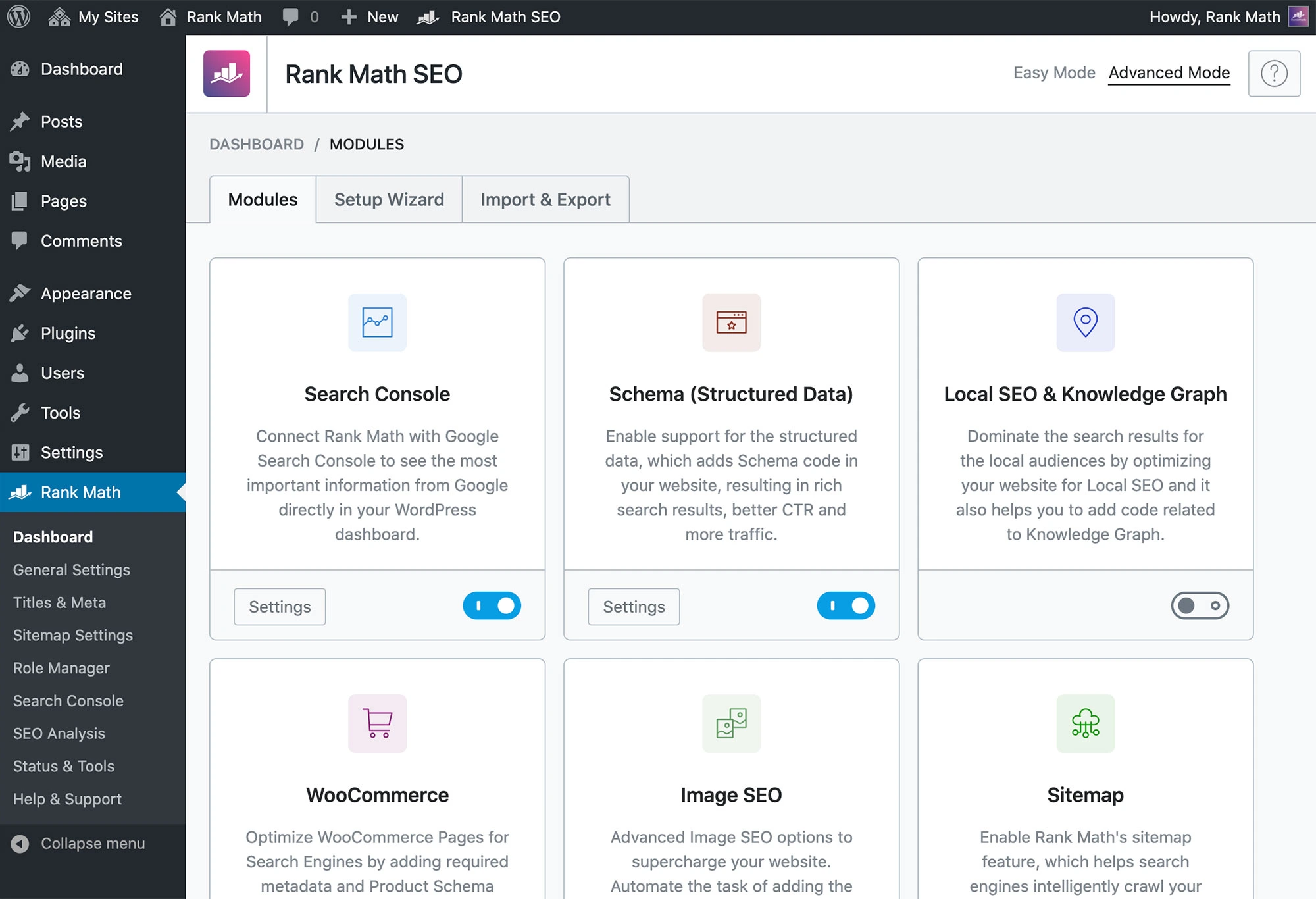
It offers both a free Lite version and premium plans, making it an accessible solution for both small blogs and large-scale websites. Unlike some other SEO plugins, Rank Math includes more SEO features in its free version, providing users with a competitive advantage in the crowded WordPress SEO plugin market.
Rank Math’s most notable feature is its ease of use. With a streamlined setup wizard, it simplifies the configuration process compared to other SEO plugins like Yoast SEO. While Yoast offers a multi-step setup process, Rank Math’s setup takes fewer steps, making it a more efficient choice for users, especially beginners. The free version also includes more features than some competitors, including Google Trends integration, keyword rank tracking, and more.
Key Features of Rank Math
- Import of SEO Data During Setup: Easily migrate from other SEO plugins with a built-in import tool.
- SEO Meta Box: Add title, description, and keyphrase to posts and pages, with real-time content analysis and improvement suggestions.
- Google Search Console Integration: Connect to Google Search Console and access detailed insights about your site’s performance.
- Open Graph Metadata: Automatically add Open Graph tags to ensure social media posts display correctly with images and descriptions.
- Advanced Schema Markup: Rich snippet support, helping search engines understand and display your content better.
- Automatic Redirects: Set up automatic redirects to avoid 404 errors and preserve link equity.
- Google Analytics Integration: Track user behavior and optimize content based on performance data.
Pricing
Rank Math offers a free Lite version that includes most of the core features needed for basic SEO optimization. However, for those requiring more advanced features, Rank Math also offers premium plans.
Rank Math Free
Lite version with essential SEO features for small websites and blogs.
Free
Rank Math Pro
Single Site License includes advanced schema, analytics, and keyword tracking.
$59 / year
Rank Math Business
100 Sites License is ideal for agencies managing multiple websites.
$499 / year
The premium plans provide access to additional features, such as advanced keyword tracking, unlimited schema types, and priority support. For websites with multiple pages, larger businesses, or those in need of advanced SEO capabilities, the premium version of Rank Math is an excellent investment.
2. Yoast SEO: User-Friendly Optimization
Yoast SEO is one of the most widely used and trusted SEO plugins for WordPress. Known for its simplicity and powerful features, Yoast SEO is designed to help website owners optimize their content for search engines and improve their website’s overall visibility.
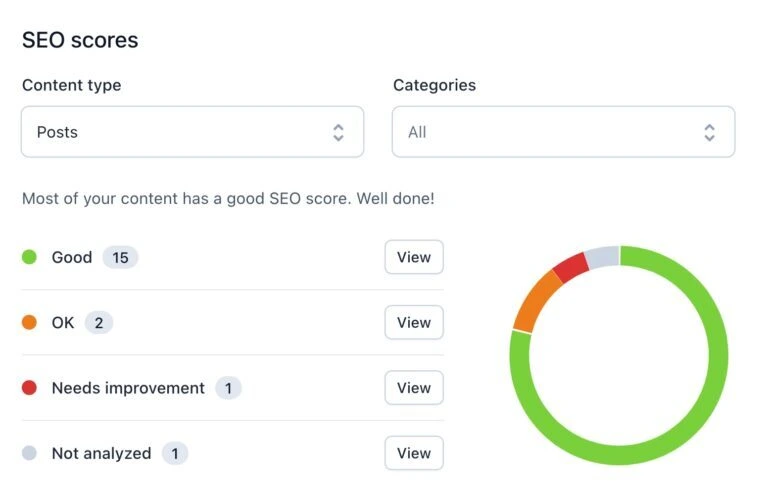
What makes Yoast SEO stand out is its comprehensive approach to SEO, offering features that cover both on-page and technical optimization. The plugin helps users optimize a website’s content for better rankings by analyzing factors like keyword usage, readability, and metadata. Yoast also takes care of technical SEO aspects, such as creating XML sitemaps and optimizing robots.txt files.
Key Features of Yoast SEO
- Content Analysis and Optimization: Real-time analysis of your content for keyword usage, readability, and SEO improvements.
- SEO Meta Box: Easily manage SEO elements such as titles, meta descriptions, and focus keywords for each page or post.
- XML Sitemap Generation: Automatically generates and submits XML sitemaps to search engines for improved crawlability.
- Google Search Console Integration: Integrates with Google Search Console to track website performance, indexing status, and crawl errors.
- Open Graph and Twitter Card Support: Customize metadata for social sharing on platforms like Facebook and Twitter.
- Redirect Manager (Premium): Set up redirects to avoid 404 errors and maintain SEO value from old URLs.
- Content Insights (Premium): Analyze the content’s focus keyword usage and how well it aligns with search intent.
- Advanced Schema Markup (Premium): Add schema to help search engines better understand your content and display rich snippets.
Pricing
Yoast SEO offers both a free version and a premium version with additional features for more advanced optimization.
Yoast SEO Free
Available at no cost, providing basic SEO tools for most websites.
Free
Yoast SEO Premium
Single-site license with advanced features and optimization tools.
$99 / year
Yoast SEO Multiple Sites
Premium version for multiple sites with pricing based on site count.
Contact
The premium version of Yoast SEO offers features such as internal linking suggestions, content insights, the ability to redirect URLs, and advanced schema support. These features make the premium version ideal for websites with more complex SEO needs or multiple pages that require frequent updates.
3. All-in-One SEO (AIOSEO): Versatile Optimization
All in One SEO Pack (AIOSEO) is one of the most popular and feature-rich SEO plugins available for WordPress. With over 2 million active users, AIOSEO is trusted by website owners of all sizes to improve search engine rankings and optimize their content. This powerful plugin is known for its ease of use, offering a variety of tools that help both beginners and advanced users improve their site’s visibility and SEO performance.
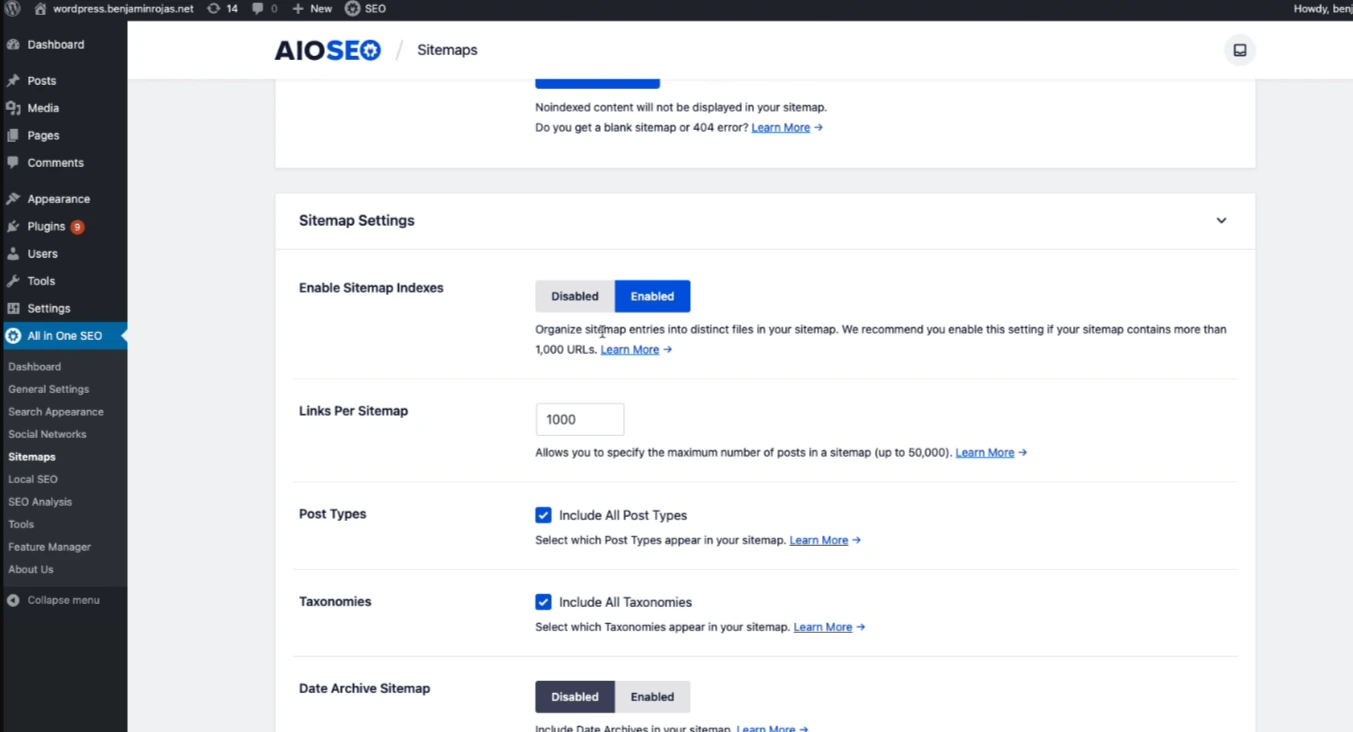
The main appeal of AIOSEO is its user-friendly interface that simplifies complex SEO tasks. After installation, the plugin’s setup wizard walks you through the process of configuring the best SEO settings for your website’s specific needs.
Whether you run a blog, an e-commerce site, or a corporate website, AIOSEO tailors its recommendations to suit your business type, making it an ideal choice for users at any experience level.
Key Features of All in One SEO Pack (AIOSEO)
- TruSEO On-Page Analysis: Provides a step-by-step checklist for optimizing your posts and pages for better SEO results.
- Dynamic Meta Tag Generator: Automatically creates SEO titles and meta descriptions using dynamic values like the current year, month, day, custom fields, and author info.
- Integration with Semrush: Discover additional keywords and rank higher by using data from Semrush.
- Rich Snippet Schema Markup: Adds schema markup to your content for rich results and improved visibility in search engines.
- XML Sitemap Generation: Automatically generates XML sitemaps with advanced controls for better indexation.
- SEO Health Check: A comprehensive SEO health check tool that identifies potential issues with your website’s SEO.
- Open Graph Metadata for Social Media: Customize how your posts appear on social platforms like Facebook, Twitter, and Pinterest with Open Graph metadata.
- WooCommerce SEO Tools: Special SEO tools for eCommerce sites, including product page optimization, product image SEO, and dynamic content optimization.
- Advanced Features for SEO Professionals: Control your RSS feeds, Google News sitemaps, video SEO, breadcrumbs, redirects, and local SEO for more advanced optimization.
- User Role-Based SEO Configuration: Manage SEO settings for different user roles, allowing for fine-grained control over who can access and modify SEO features.
Pricing
All-in-One SEO offers both a free version and several premium plans. The free version provides essential SEO features for small websites, while the premium version offers more advanced tools and greater control over SEO settings.
AIOSEO Free
Free version with basic SEO tools, including meta tags, XML sitemaps, and social media integration.
Free
AIOSEO Pro
Single Site License includes TruSEO, advanced schema markup, and premium features.
$49.50 / year
AIOSEO Agency
Agency License is designed for agencies managing SEO for multiple client websites.
$299.50 / year
The premium version of AIOSEO includes additional features such as advanced schema markup, priority support, and tools for e-commerce optimization, making it a great choice for businesses and agencies that require more advanced SEO capabilities.
4. SEOPress: White-Labeling Potential
SEOPress is a highly regarded SEO plugin for WordPress that balances simplicity with powerful features. It offers all the essential tools needed for website optimization, such as meta title and description management, Open Graph support, image and content XML sitemaps, redirects, and much more.
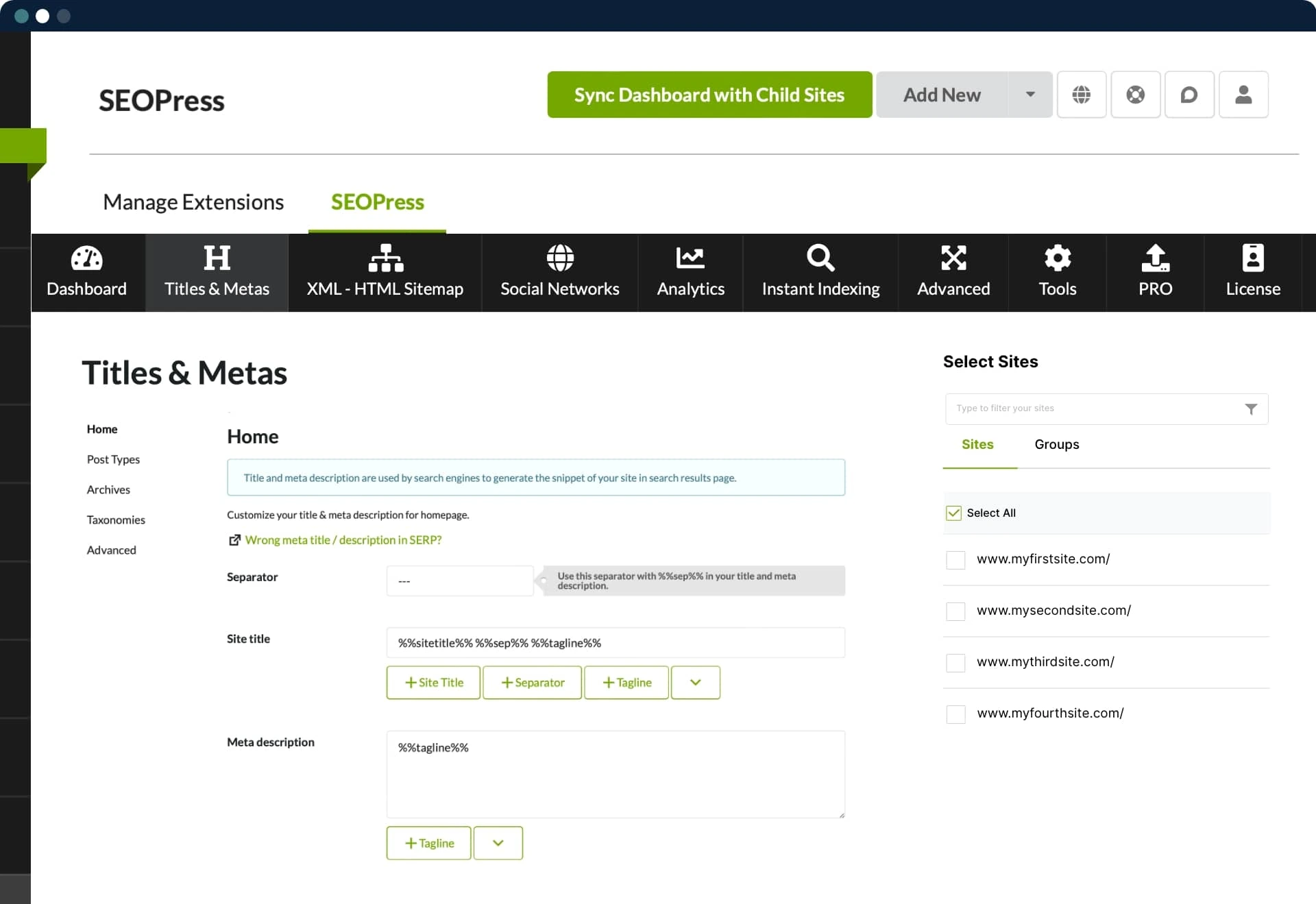
SEOPress is known for its user-friendly interface, making it easy for both beginners and experienced users to take full advantage of its capabilities. It is a versatile plugin that provides comprehensive SEO tools at a more affordable price compared to some of its competitors.
Key Features of SEOPress
- WooCommerce Integration: Optimize your eCommerce store with tools for product page SEO, image optimization, and metadata management.
- Schema Markup: Add rich snippets to your pages, improving CTR and visibility in search results.
- XML Sitemap Generator: Automatically generate and manage sitemaps, making it easier for search engines to crawl and index your site.
- Content Analysis Tool: Provides suggestions for improving your content’s SEO, including keyword usage, structure, and readability.
- Open Graph and Twitter Cards: Optimize how your content appears on social media platforms for better engagement.
- Image SEO: Optimize your images for faster load times and better visibility in image search.
- Redirects: Easily manage 301 redirects to preserve link equity and avoid 404 errors.
- Advanced SEO Controls: Access to advanced features for experienced users, including nofollow management, custom fields, and more.
Pricing
SEOPress offers both a free version and a premium version, making it an affordable option for users with varying SEO needs.
SEOPress Free
Essential SEO tools such as meta titles/descriptions, XML sitemaps, Open Graph support, and content analysis.
Free
SEOPress Pro
Single Site License advanced features like WooCommerce integration, schema markup, and image SEO.
$49 / year
SEOPress Pro Unlimited
Unlimited Site License is ideal for agencies or users managing multiple websites.
$99 / year
The premium version of SEOPress is highly affordable compared to other top-tier SEO plugins, making it an attractive option for users looking for a budget-friendly solution without sacrificing quality or features.
5. Schema Pro: Boosting Rich Snippets
Schema Pro is a powerful WordPress SEO plugin designed specifically to help users implement schema markup on their websites. Schema markup is a form of structured data that allows search engines to better understand the content of a webpage, ultimately leading to enhanced visibility in search results through rich snippets.
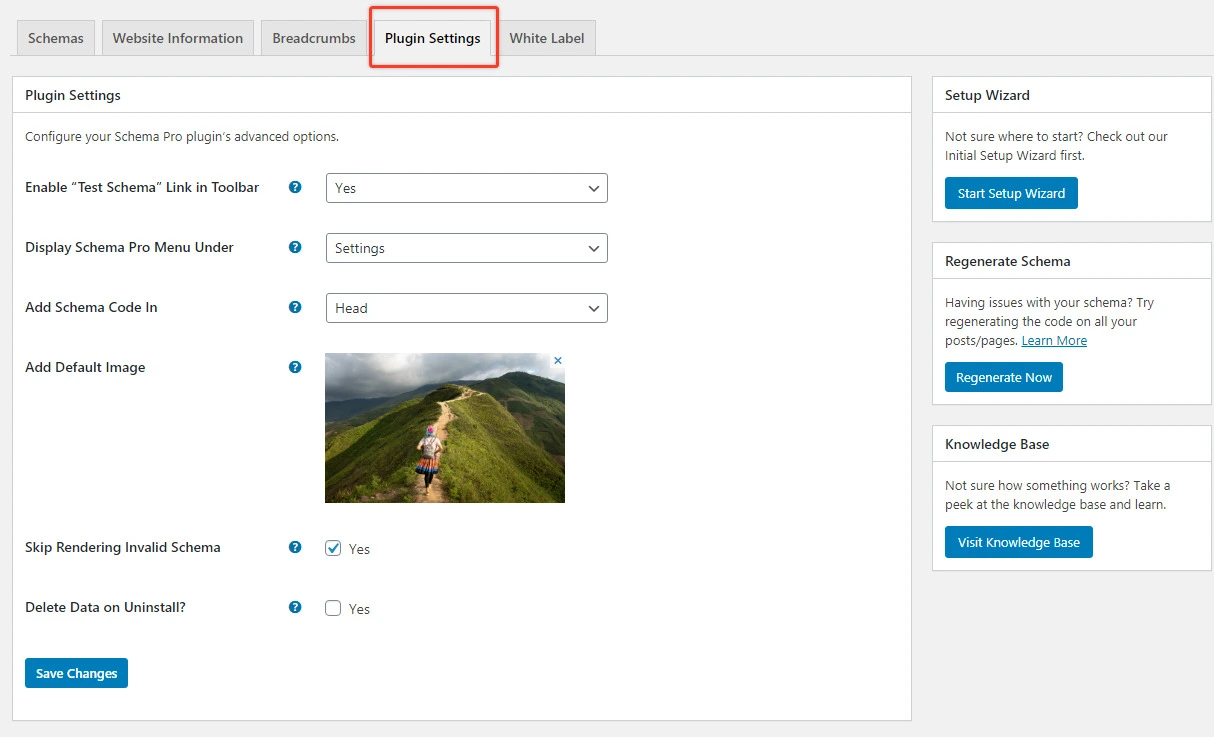
These rich snippets can display additional information like star ratings, product prices, images, or videos, making your content stand out in a crowded search engine results page (SERP).
What makes Schema Pro stand out is its ability to easily integrate with your existing WordPress SEO plugins, such as Yoast SEO or Rank Math. While these plugins already include basic schema markup, Schema Pro extends this functionality by offering over 20 advanced schema types. This flexibility makes it a valuable addition for users who need more comprehensive control over their website’s schema data.
Key Features of Schema Pro
- Over 20 Advanced Schema Types: Supports a wide range of schema types such as Product, Review, Recipe, Event, FAQ, and more.
- Article Guidelines: Provides step-by-step instructions on which schema types to use for each type of content, ensuring accurate implementation.
- Live Schema Testing: Preview how your rich snippets will appear in search engine results before going live.
- Unlimited Websites: A single license allows you to implement schema markup on an unlimited number of websites.
- Integration with Existing SEO Plugins: Works seamlessly alongside plugins like Yoast SEO and Rank Math by mapping their data to Schema Pro fields.
- Easy Setup: Simple, user-friendly interface that requires no coding knowledge for implementing schema markup.
- Custom Schema Markup: Allows advanced users to customize schema for specific needs.
Pricing
Schema Pro is a premium plugin, with pricing starting at $79 per year for a single-site license. Alternatively, you can pay a one-time fee of $249 for a lifetime license, which ensures access to all future plugin updates and features without recurring annual costs.
Schema Pro Annual
Single-site license with all advanced schema features and yearly updates.
$79 / year
Schema Pro Lifetime
One-time payment for unlimited access with no renewal fees and lifetime updates.
$249
Whether you run a single website or multiple, Schema Pro is a great way to enhance your SEO efforts and improve your site’s performance in search engines.
6. MonsterInsights: Unveiling Analytics Insight
MonsterInsights is widely regarded as the best Google Analytics plugin for WordPress, helping website owners track and analyze their site’s traffic with ease. Whether you’re a beginner or a seasoned marketer, MonsterInsights simplifies Google Analytics and brings all the essential data directly into your WordPress dashboard. With over 3 million active installations, it’s the go-to plugin for anyone serious about optimizing their SEO strategy based on reliable, actionable data.
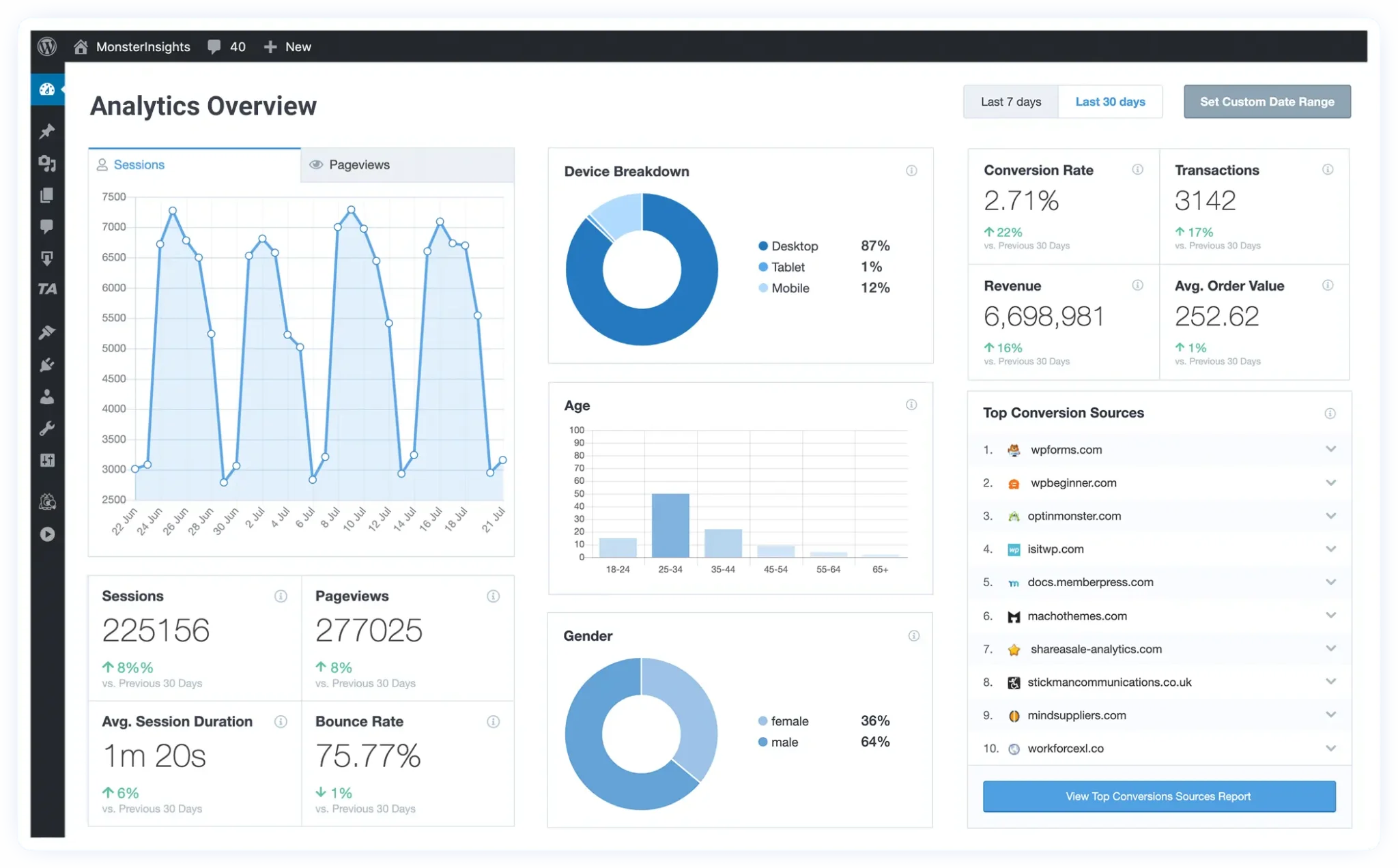
One of the key features of MonsterInsights is its annotation tool, which lets you add notes to reports. For example, you can annotate when you make changes like updating your homepage’s meta title or publishing a new blog post, allowing you to directly track how those changes impact your site’s traffic and performance. This level of detail helps you fine-tune your SEO efforts and make informed decisions for future optimizations.
Key Features of MonsterInsights
- Google Analytics Dashboard: View real-time Google Analytics data directly in your WordPress dashboard for quick access to performance metrics.
- Universal Tracking: Set up tracking across devices and campaigns with just a few clicks, no coding needed.
- Referral Traffic Tracking: Track where your referral traffic is coming from to focus on building partnerships and backlinks.
- Enhanced eCommerce Tracking: Track product performance, sales, and customer behavior with one-click Google Analytics eCommerce integration for WooCommerce, Easy Digital Downloads, and MemberPress.
- A/B Testing Integration: Use Google Optimize to run A/B tests on your website to improve conversion rates.
- Event Tracking: Easily track clicks, downloads, and other important user actions on your website.
- Content Tracking: Monitor how specific pieces of content are performing, allowing you to adjust your content strategy accordingly.
- Performance and Optimization: Monitor site performance and make adjustments to improve loading speed and sample rate.
Pricing
MonsterInsights offers both a free version (MonsterInsights Lite) and a premium version with more advanced features for users who need deeper insights.
MonsterInsights Lite
Free version with basic features, including essential Google Analytics tracking and reports.
Free
MonsterInsights Pro
Premium features like eCommerce tracking, referral traffic tracking, A/B testing, and enhanced reporting.
$99.50 / year
MonsterInsights Agency
Designed for agencies managing multiple websites and clients, with support for unlimited sites.
$399.50 / year
MonsterInsights offers a 14-day money-back guarantee, giving users peace of mind when trying out the plugin’s premium features.
7. WP Rocket: Speed and Performance Booster
WP Rocket is widely recognized as the best caching plugin for WordPress, offering a comprehensive suite of tools to speed up your website. By improving your site’s performance, WP Rocket helps boost your SEO rankings, as page speed is a critical factor for both user experience and search engine optimization.
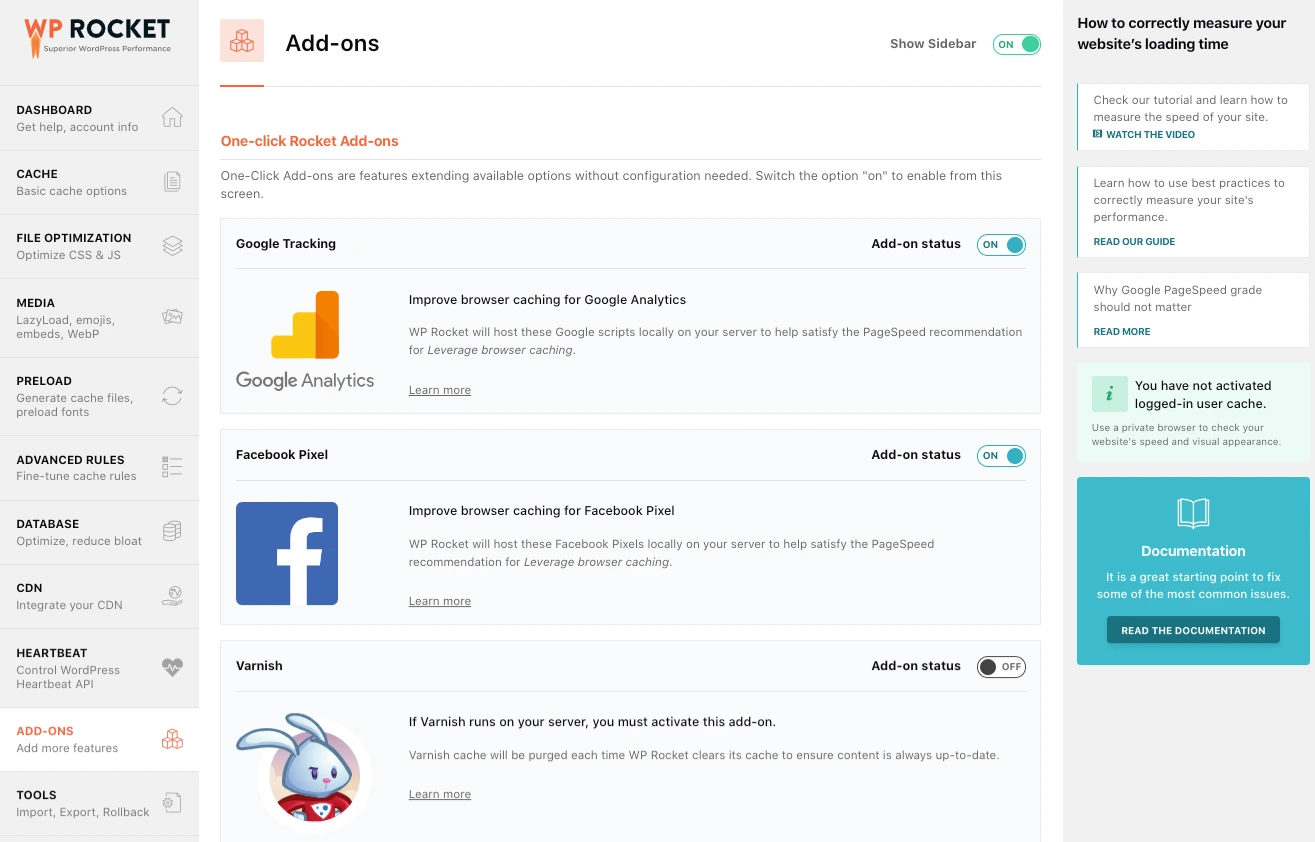
Unlike other caching plugins that require complex configurations, WP Rocket simplifies the process, offering a user-friendly interface that automatically handles most of the technical aspects of caching and optimization.
One of the key strengths of WP Rocket is its ability to improve page speed by storing a static copy of your pages in the cache. This allows WordPress to serve the cached version to users instead of generating a new page each time, significantly reducing page load times. With faster load times, your website performs better on search engines, leading to better rankings and a more positive user experience.
Key Features of WP Rocket
- Page Caching: Store static versions of your pages to reduce server load and improve load times for visitors.
- Cache Preloading: Automatically preloads your cache to ensure visitors get a cached version of your pages as soon as they land on your site.
- GZIP Compression: Minifies and compresses JavaScript, CSS, and HTML files, reducing bandwidth usage and improving load speed.
- Browser Caching: Stores static resources in the user’s browser, speeding up return visits and reducing server load.
- eCommerce Optimization: Excludes sensitive pages like cart and checkout from the cache to avoid interference with the purchase process.
- Lazy Load Images: Delays loading of images until they are visible on the screen, reducing initial page load times.
- DNS Pre-Fetching: Speeds up page load times by pre-fetching DNS requests.
- CDN Integration: Seamless integration with popular Content Delivery Networks to further optimize site performance.
- Easy Setup: User-friendly interface with automatic configuration to simplify speed optimization for all users.
Pricing
WP Rocket is a premium plugin with competitive pricing considering the value it provides for improving site speed and performance. The plugin comes with a 14-day money-back guarantee, so you can try it risk-free before committing.
Single Site License
Perfect for individual websites looking to boost performance and speed optimization.
$49 / year
Three Sites License
Ideal for users managing multiple websites with comprehensive caching features.
$99 / year
Unlimited Sites License
Best value for agencies and developers managing unlimited WordPress websites.
$249 / year
WP Rocket’s pricing is competitive for a premium plugin that offers such powerful features. Given the immediate impact on website speed and the positive effect it has on SEO, many users find it worth the investment.
8. Broken Link Checker: Maintaining Link Health
Broken Link Checker (BLC) is a simple yet essential WordPress SEO plugin that automatically monitors your website for broken links and missing images, alerting you to issues that may negatively impact your site’s SEO and user experience.
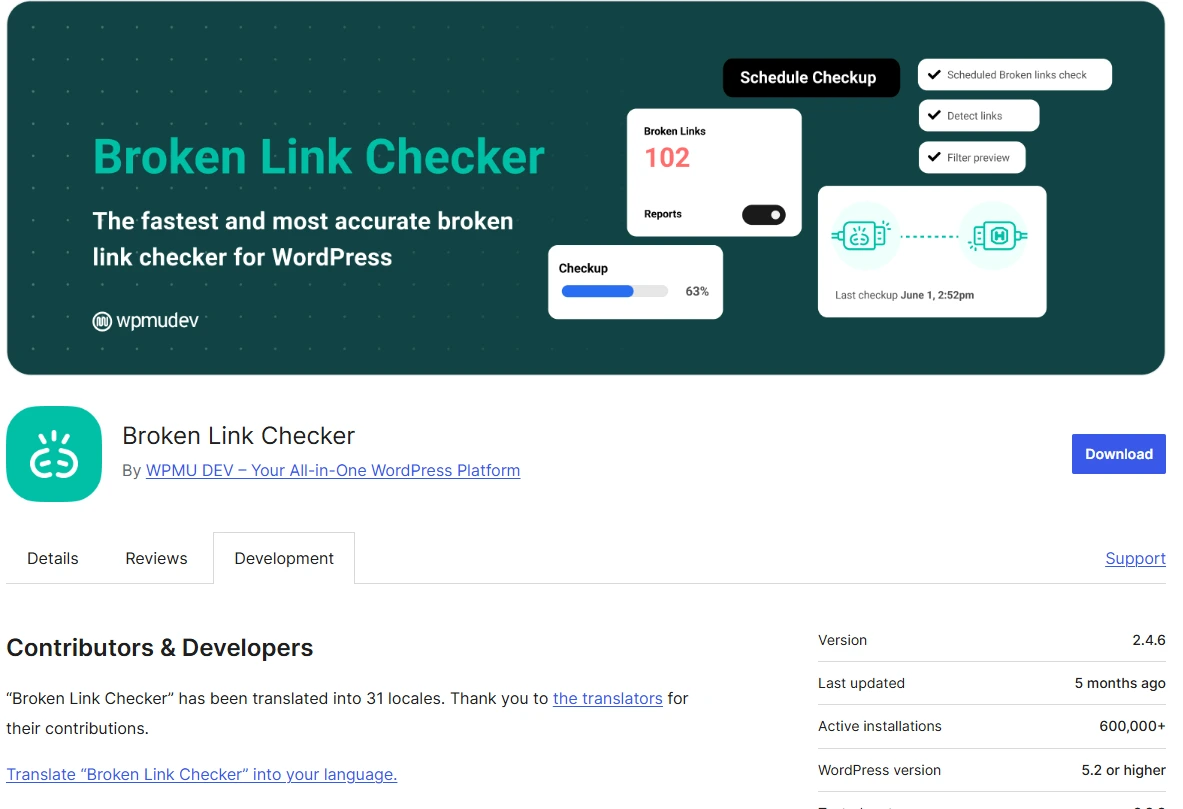
Broken links, whether internal or external, can harm your SEO performance and frustrate visitors, leading to higher bounce rates and lower rankings. BLC helps keep your site in top shape by ensuring that all links are working as they should.
What makes Broken Link Checker an invaluable tool is its ability to detect both broken internal links (links within your site) and external links (links pointing to other websites). Scanning your entire website, including posts, pages, comments, and other content, helps maintain a seamless browsing experience. With its comprehensive scanning and real-time notifications, BLC ensures you never miss a broken link and can address issues immediately.
Key Features of Broken Link Checker
- Comprehensive Link Checking: Automatically scans your website for broken links and missing images, both internal and external.
- Complete Link Status Details: Provides in-depth information about each link’s status, including URL, location, and HTTP status.
- Customizable Settings: Allows you to adjust the plugin’s settings to scan specific post types or statuses, giving you more control over your scans.
- Automated Monitoring: Continuously monitors your website for broken links, so you don’t have to manually check each page.
- Easy Fixes: Quickly edit or remove broken links, recheck links, or dismiss errors directly from the plugin’s interface.
- Real-Time Notifications: Alerts you to any broken links found on your site, so you can fix them immediately.
- Time-Saving Automation: Eliminates the need for manual checks, saving you time and ensuring your website stays error-free.
Pricing
Broken Link Checker is a free plugin, making it an excellent option for WordPress users looking to improve their site’s SEO without any cost. For users who require additional features or want to support the plugin’s development, paid plans are available, starting at $4.99.
Free Version
Includes all essential features for scanning and fixing broken links on your website.
Free
Paid Plans
Enhanced support and advanced features for users requiring additional functionality.
From $4.99
Given that the free version already offers comprehensive functionality, it’s an excellent choice for website owners looking to fix broken links without spending any money.
9. Redirection: Streamlining URL Management
Redirection is a powerful and user-friendly WordPress plugin designed to help you manage redirects and fix 404 errors on your site. By setting up proper redirects, you can improve both your SEO performance and user experience.
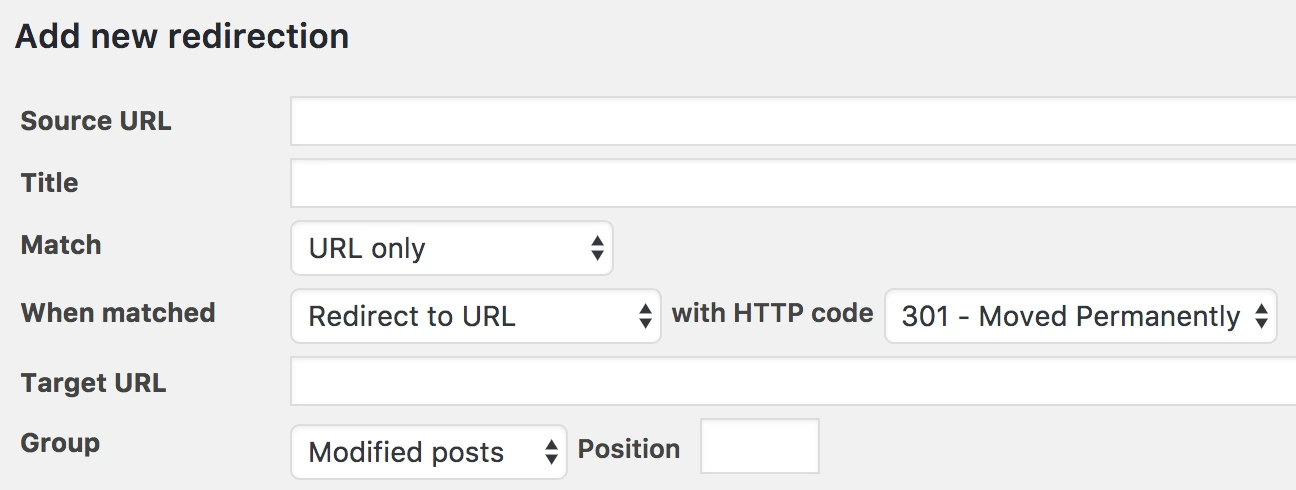
Broken links can negatively impact your search engine rankings, and a poor user experience can lead to higher bounce rates and lower conversion rates. Redirection makes it easy to maintain a smooth navigation experience for your visitors while keeping your site SEO-friendly.
Key Features of Redirection
- Comprehensive Redirect Management: Easily create and manage 301 (permanent) and 302 (temporary) redirects for individual pages or bulk redirects.
- 404 Error Tracking: Identifies and tracks broken or missing links, giving you the ability to fix issues quickly.
- Simple Interface: The plugin offers a clean, user-friendly interface that allows you to manage redirects and view errors without any hassle.
- Advanced Redirect Options: Redirection supports conditional redirects based on login status, referrer URLs, and more, giving you full control over how redirects are handled.
- No Coding Required: Set up and manage redirects with ease, even if you’re not familiar with coding.
- Free Plugin: Redirection is a completely free plugin available in the WordPress repository, making it accessible to all WordPress users.
Pricing
Redirection is a free plugin, available directly from the WordPress plugin repository. The free version includes all the core features needed to manage redirects and fix 404 errors. There are no premium tiers or hidden costs, making it a cost-effective solution for users who want a dedicated tool for managing redirects.
No Cost Plan
Complete redirect management solution with all core features included at no cost.
Free
10. W3 Total Cache: Boost Your WordPress Site’s Speed and Performance
W3 Total Cache is widely regarded as one of the most powerful and complete WordPress performance optimization plugins available. It helps you enhance your website’s speed and performance, which are critical factors for improving your SEO rankings. By reducing page load times and optimizing your site for better performance, W3 Total Cache can have a direct impact on your search engine rankings.
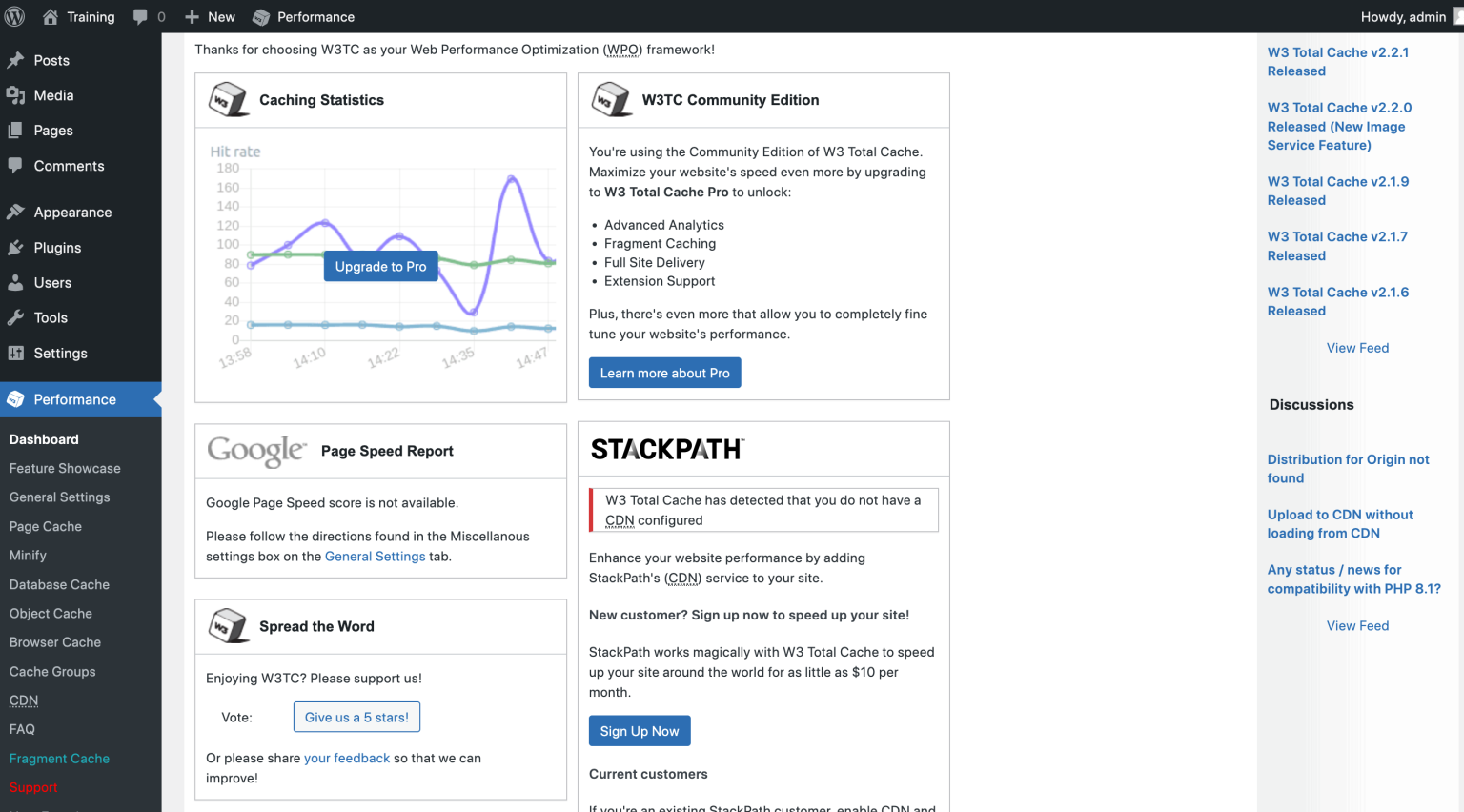
The plugin uses a range of features to optimize your site’s performance, including page and browser caching, minification of files, and integration with Content Delivery Networks (CDN). These features help reduce server load, speed up content delivery, and ensure that users experience faster load times when visiting your site.
Key Features of W3 Total Cache
- CDN Integration with MaxCDN: Speeds up content delivery by distributing your content across global servers, reducing server load, and improving load times.
- Page and Browser Caching: Improves repeat visits by caching pages and reducing the need to regenerate content on each visit.
- Caching in Memory, Disk, or CDN: Allows you to store cached content in memory, disk, or CDN for faster delivery, reducing bandwidth usage by up to 80%.
- Minification of HTML, CSS, and JavaScript: Reduces file sizes by minifying HTML, CSS, and JavaScript files, speeding up your site.
- Website Security Features: Includes features to protect your website from attacks and enhance its security.
- Caching Statistics: View detailed caching performance insights and statistics to monitor and optimize your caching setup.
Pricing
W3 Total Cache offers both a free Lite version and a premium Pro version, providing flexibility for users at different levels of need. While the Lite version covers the essential caching features, the Pro version offers more advanced caching options, including enhanced performance settings, dedicated support, and additional optimization features.
W3 Total Cache Lite
Free version covering essential caching features for basic performance optimization.
Free
W3 Total Cache Pro
Advanced features like object caching, database caching, and enhanced support for a single site.
$99 / year
The Pro version of W3 Total Cache offers a lot of added functionality that can be especially beneficial for websites with higher traffic or more complex performance needs. If you’re looking to maximize your site’s speed and ensure peak performance, the Pro version is a solid investment.
How We Test & Review WordPress SEO Plugins?
Testing and reviewing WordPress SEO plugins requires a structured approach to ensure that each plugin delivers on its promises and provides measurable improvements in site performance.
We base our evaluations on several key factors that affect SEO outcomes, including ease of use, feature set, performance impact, and the ability to integrate with other tools. Here’s how we conduct our testing process:
1. Ease of Use: We assess the plugin’s setup and interface to determine how easy it is for users to get started with SEO optimization. An effective plugin should offer an intuitive dashboard, simple installation, and accessible features that don’t require advanced technical knowledge.
2. Features & Customization: The most effective SEO plugins come with a wide range of features, from on-page optimization tools (like meta tag generation and keyword analysis) to advanced settings (such as schema markup, content analysis, and WooCommerce SEO). We test the breadth of features to ensure that the plugin meets the needs of all users, whether they are beginners or experienced SEO professionals.
3. Impact on Site Performance: One of the most critical aspects of an SEO plugin is how it affects your site’s performance. We monitor the plugin’s impact on site speed, load times, and resource usage. A good SEO plugin should enhance SEO without slowing down your website.
4. Support & Documentation: Effective support is vital, particularly when using advanced features. We test the plugin’s customer support, documentation, and community resources to ensure users have access to the help they need when they encounter issues.
5. SEO Results: Finally, we evaluate how well the plugin contributes to improved search engine rankings over time. We run tests with specific keywords and monitor how the plugin helps optimize content, improve page structure, and boost rankings on Google and other search engines.
Through this comprehensive testing process, we ensure that the plugins we recommend deliver real, measurable improvements for WordPress users looking to optimize their sites for search engines.
Tip: When optimizing your website, don’t forget about enhancing user interaction. Adding a
WordPress contact form plugin can greatly improve engagement by making it easy for users to reach out. This can directly affect your site’s performance and conversions, complementing the SEO efforts you’re already making.